01 Inventory
Agents already report what is installed.
Windows build and update revision, Linux packages and installed programs. Nothing new to deploy, nothing probing your network.
Vulnerability assessment software built into DeviceManager, with no extra scanner and no network scanning. The server matches the inventory its agents already report against current threat data from Microsoft, Linux distributions, NVD, CISA KEV and FIRST EPSS, then tells you what to fix first, and by when.
Vulnerability Assessment
Known vulnerabilities on managed endpoints, matched against current threat data — and how to fix them
Recreated from the DeviceManager 7.0 Vulnerability Assessment overview. Sample data, for illustration.
How it works
01 Inventory
Windows build and update revision, Linux packages and installed programs. Nothing new to deploy, nothing probing your network.
02 Threat data
MSRC, Ubuntu notices, distribution advisories (OSV), NVD, CISA KEV and FIRST EPSS. Synced every 12 hours, or imported as a signed bundle.
03 Match and rank
Re-evaluated every 30 minutes and on new data. Each finding carries severity, CVSS, KEV, EPSS, a 0–100 risk score and an SLA date.
04 Fix
VAPT never installs anything itself. It prepares a deployment with only the needed device-and-patch pairs; approvals and maintenance windows still apply.
05 Verify
Fixed only when the device's own inventory shows the fixed version. A successful deployment is not enough, and the finding re-opens if the vulnerable version returns.
Agent inventory
Threat data
Inventory received
Threat data synced
Online every 12 h — or a signed .dmvb bundle
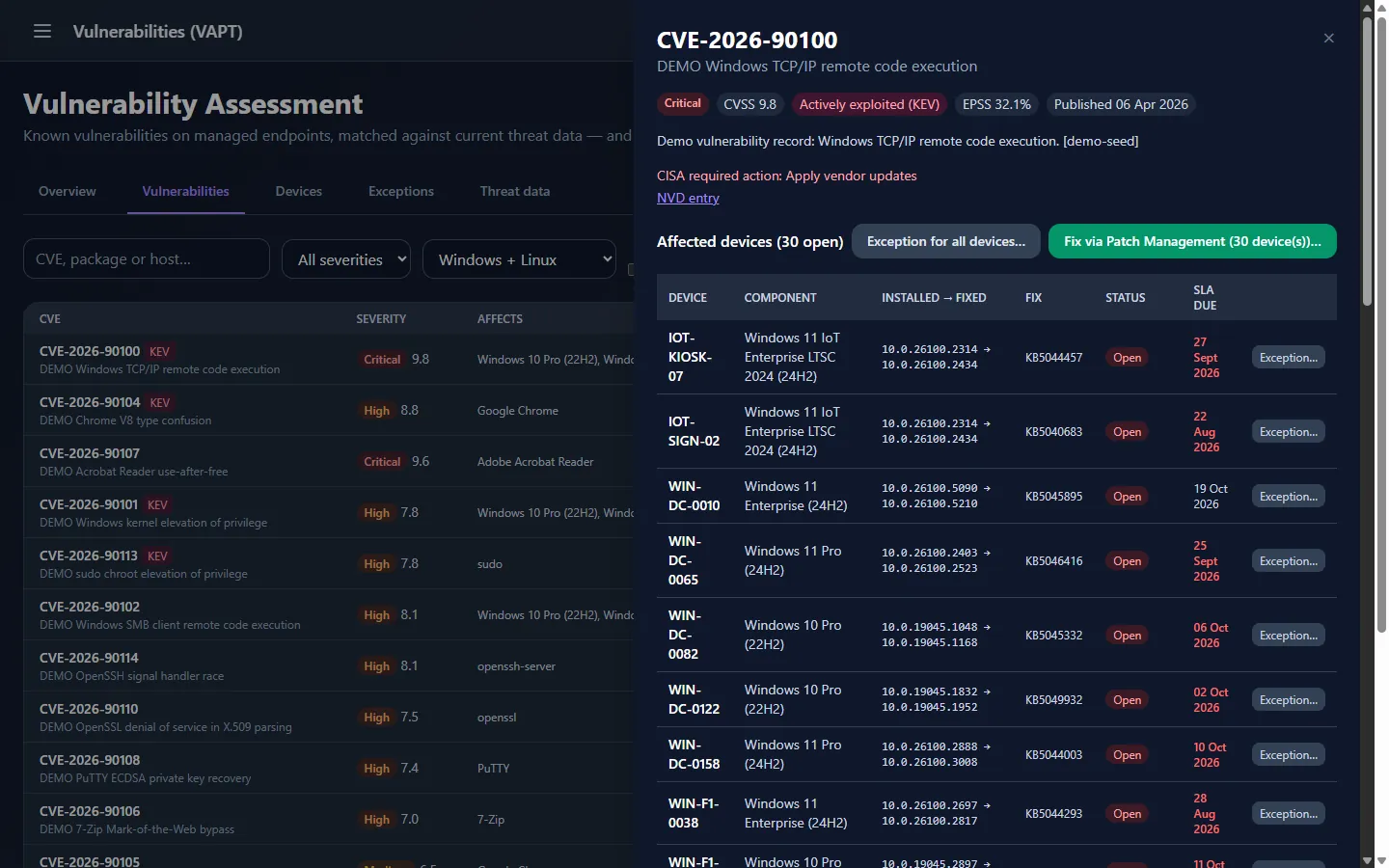
CVE-2026-90100
100 riskWindows TCP/IP remote code execution
SLA · 7 days from first detection
Patch deployment · pre-filled
Next inventory · WIN-DC-0082
Fixed10.0.19045.1168 ≥ fixed version
Deployment “success” alone never closes a finding.
Severity · CVSS · KEV · EPSS
Every finding carries four signals from the source data. DeviceManager combines CVSS, CISA KEV and FIRST EPSS into one 0–100 risk score, and every list is sorted by it.
Windows TCP/IP remote code execution
Sample finding from a DeviceManager 7.0 demo environment.
SLA clocks
Due dates count from the day a finding is first detected. The targets are fixed in DeviceManager 7.0, and anything overdue lands in the Past SLA tile and filter.
Five findings, first detected on the same day
Day 40 since first detection
What is covered
An agent-based alternative to running an on-premise vulnerability scanner for your managed endpoints. Only devices with a DeviceManager agent are assessed, and only where the match is reliable.
Windows 10, Windows 11 and Windows Server 2016 to 2025
Ubuntu, Debian, RHEL, Rocky Linux and AlmaLinux
About 40 widely used programs, from browsers to databases
The application catalogue includes
Programs outside the catalogue are not assessed. A device that can't be assessed reliably keeps its existing findings and is listed on the Overview with the reason. “Can't assess” is never treated as “fixed”.
From finding to fix
01 The CVE drawer
CVSS vector, CISA's required action for KEV entries and an NVD link, then each device with installed and fixed version, KB or advisory, status and SLA date.
02 What's ready
Fix via Patch Management lists approved patches, patches needing approval, and updates not yet scanned, with shortcuts to Patch Approvals and Compliance.
03 Pre-filled deployment
Approvals, schedules, maintenance windows and reboot settings apply. Nothing installs until you create it. Applications update from their vendor, e.g. via Package Manager.
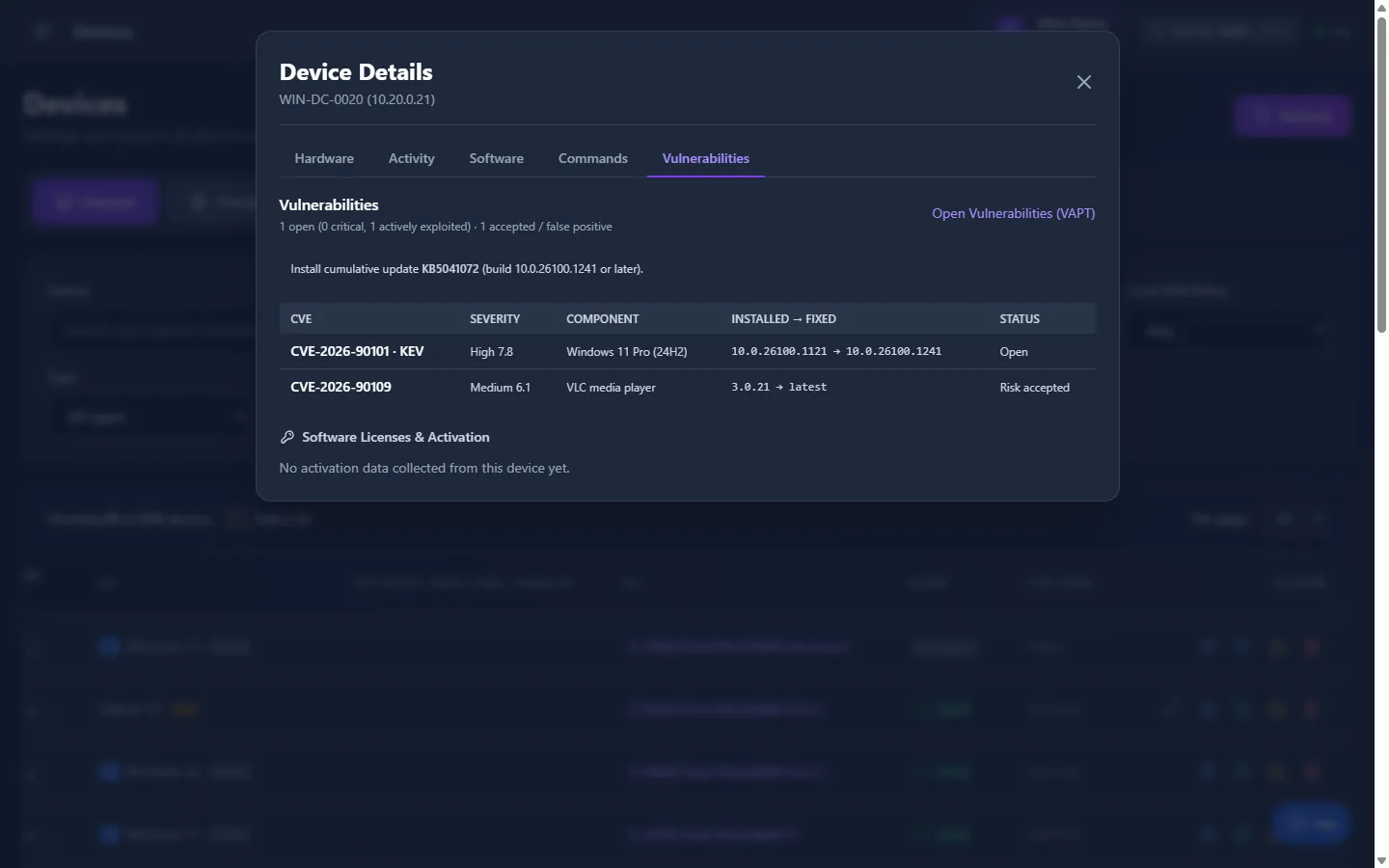
04 Per-device view
One cumulative update, N packages or N applications, with Ubuntu Pro (ESM)-only fixes flagged. Also on each device's Vulnerabilities tab.
Fix via Patch Management
CVE-2026-90100 · 30 devices
ReadyApproved patches that fix these findings
Approval1 patch needs approval first
Open Patch Approvals →Scan2 devices: run a patch scan
Open Patch Compliance →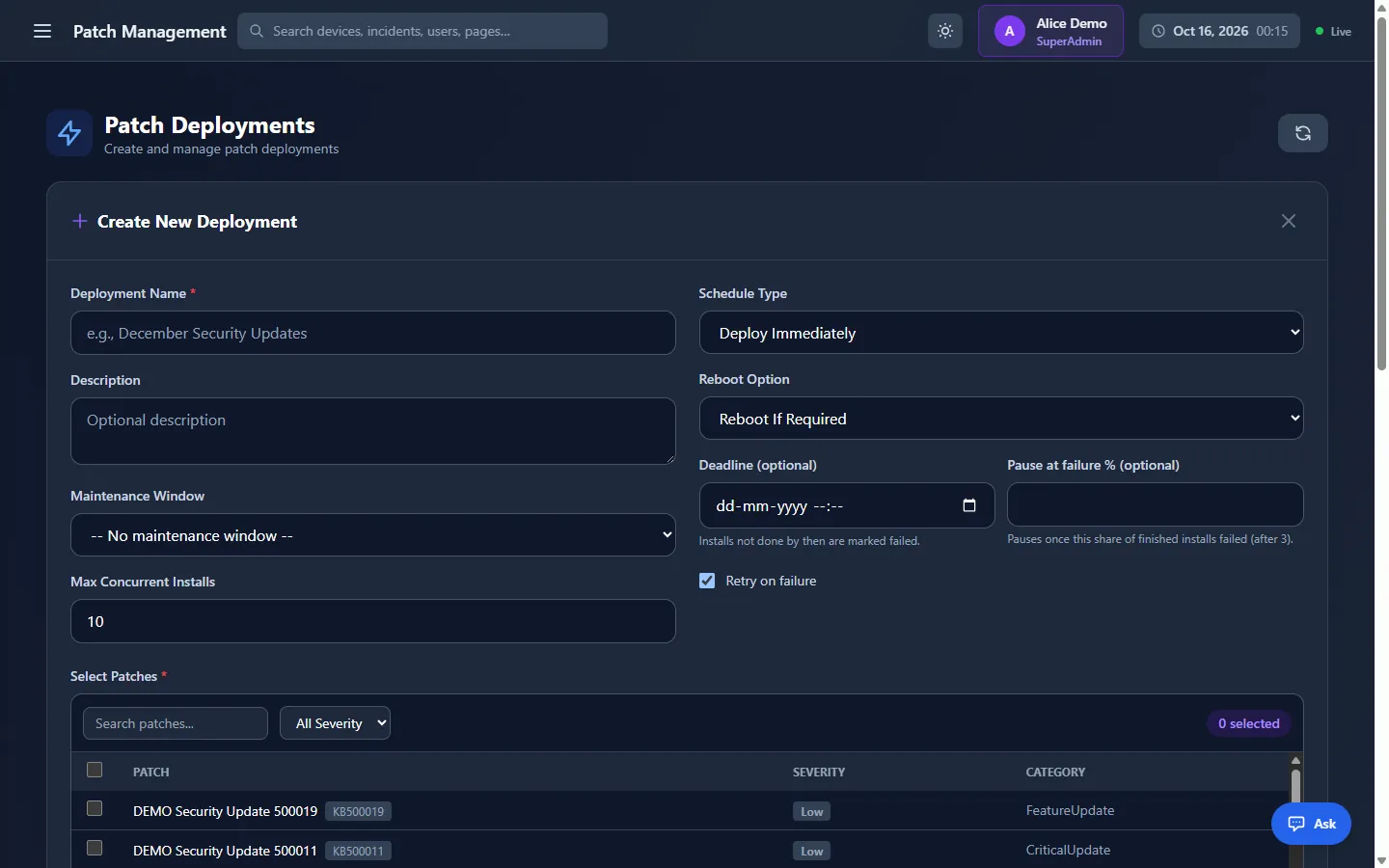
Targets · pre-filled from the CVE
How to fix
Exceptions and audit
When a vulnerability can't be fixed yet, or doesn't apply, record a decision instead of leaving it open.
Exceptions
Accepted risks · false positives“VLC is not used to open untrusted media on these machines; replacement planned in Q1.”
Out of open counts, the SLA list and the incident sourceExpired: findings re-opened automatically
“Vim is not installed for interactive users; package kept for scripts only.”
Audit log · exception created, reason and expiry recorded
Current findings with your active filters, including accepted and false-positive ones.
Online or isolated
Connected servers sync threat data every 12 hours. Isolated servers import signed bundles carried across the gap, and accept only a newer one.
Internet-connected site
Public threat data
DeviceManager · online
Downloads updates every 12 hours (1–168) and keeps 12 months of Microsoft data.
vapt-bundle exportIsolated network
DeviceManager · isolated
# once: create a signing key pair (keep the private key off isolated servers)
$ DeviceManager vapt-bundle keygen --out <folder>
# every week: export a signed threat-data bundle
$ DeviceManager vapt-bundle export --key <private.pem> --out <file.dmvb>
# isolated server: Threat data › Update threat database from a file (offline) › Import
Automation and access
Enable the “Exploitable Vulnerabilities” source and DeviceManager opens one incident per device with an open KEV finding, or one at or above a risk score (90 by default). It resolves when the findings are fixed, accepted or marked false positive.
It answers vulnerability questions using only what the asker's role can see, and can prepare a patch deployment to fix a vulnerability. Nothing installs until a person creates it. Explore the AI Assistant
Five VAPT permissions on top of DeviceManager's role-based access. Creating the deployment itself also needs the patch deployment permission.
| Permission | Allows | Default roles |
|---|---|---|
| Vapt.View | Open the page and the device tab | SuperAdminAdminManagerEngineer |
| Vapt.Remediate | Fix via Patch Management | SuperAdminAdminManagerEngineer |
| Vapt.ManageExceptions | Create and revoke exceptions | SuperAdminAdminManager |
| Vapt.Export | Export CSV | SuperAdminAdminManager |
| Vapt.ManageFeeds | Threat data settings, sync, bundle import | SuperAdminAdmin |
Questions
Vulnerability assessment is one module of DeviceManager, the self-hosted endpoint management platform, and covers agent-managed endpoints. For switches, routers and printers that can't run an agent, see network monitoring over SNMP.
Let's talk
A tailored demo of vulnerability assessment on DeviceManager 7.0, a pilot in your environment — online or air-gapped — and a deployment and licensing plan.